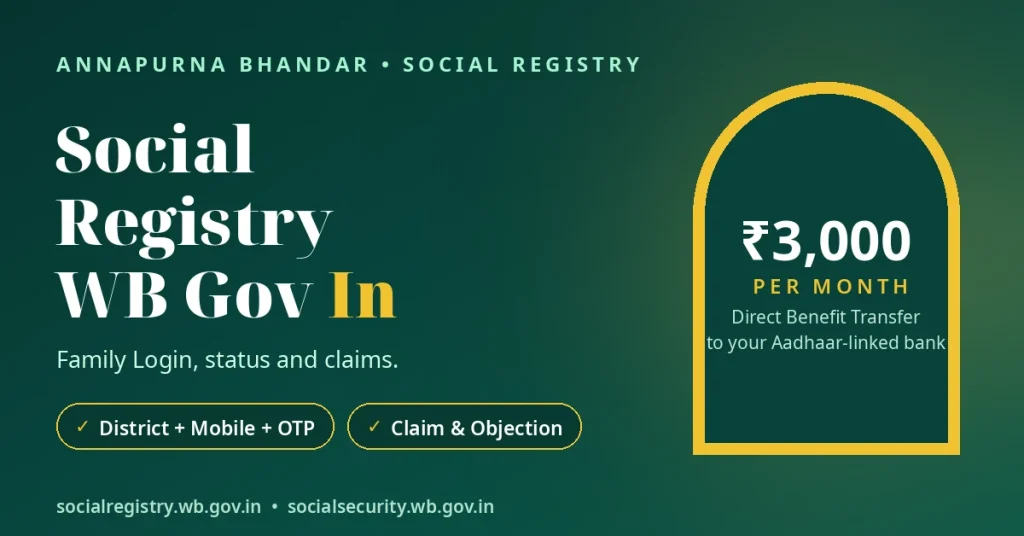
The social registry wb gov in portal (socialregistry.wb.gov.in) is where Annapurna Bhandar applicants can open their application records. Select your district, enter the mobile number registered with your application, and confirm your identity with an OTP. The portal then shows your application status and family record. The same login also provides the Claim & Objection facility.
The West Bengal Social Registry is more than an Annapurna application website. It is the state’s family-level database for social welfare schemes. This article explains what the Social Registry does, how the Family Login works, what you can see after signing in, and what to do when you face login problems.
Quick Answer
Open socialregistry.wb.gov.in and choose Citizen / Family Login.
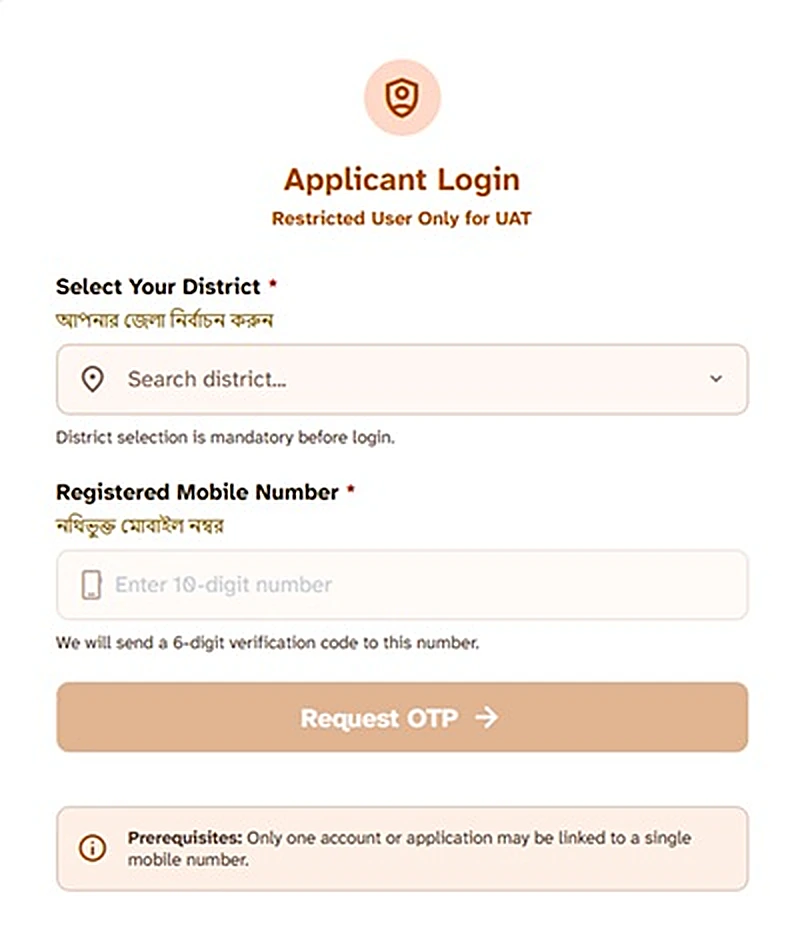
Select your district, enter the mobile number registered in your application, and confirm it with the OTP.
Your application status and family record will open inside the portal.
You cannot search for your status on this portal without logging in. The same Family Login also lets you submit a Claim or Objection and upload supporting documents.
What Is the Social Registry?
The Social Registry is the Finance Department’s beneficiary database initiative for social welfare schemes across West Bengal departments.
The official website, socialregistry.wb.gov.in, carries the title “Family Level Data Collection Portal”. The Finance Department owns the portal’s content and process, while the National Informatics Centre (NIC) designed the portal.
Annapurna Yojana applications reach this system through the Family Level Data Collection process. Applicants can submit this information at BDO, SDO, or KMC Ward offices, or online on the Social Registry portal.
Therefore, the Social Registry is not a website created only for Annapurna Bhandar. It is the state’s family record system. Annapurna is one scheme whose applications and status details live here, while the same database supports several welfare schemes.
Who Uses This Portal — And Who Does Not
Different people use different login options. Choosing the correct one helps you avoid confusion.
| Person | Login for them | What it is for |
|---|---|---|
| Annapurna applicant / family member | Citizen / Family Login | View the application status and family record; submit a Claim or Objection. |
| Government officer / office staff | Department Officer Login | Official government work only. Citizens cannot use this login and should not try. |
| Someone who wants a quick status view without OTP login | Not this portal | Use the Social Security portal’s public Track Applicant Status facility instead. See the Social Security WB Gov In status guide. |
The main difference is simple: the Social Registry provides access to your detailed family record after an OTP login. The Social Security portal, in comparison, provides a status view for people who prefer a simpler route without an OTP login.
How to Log In — Citizen / Family Login
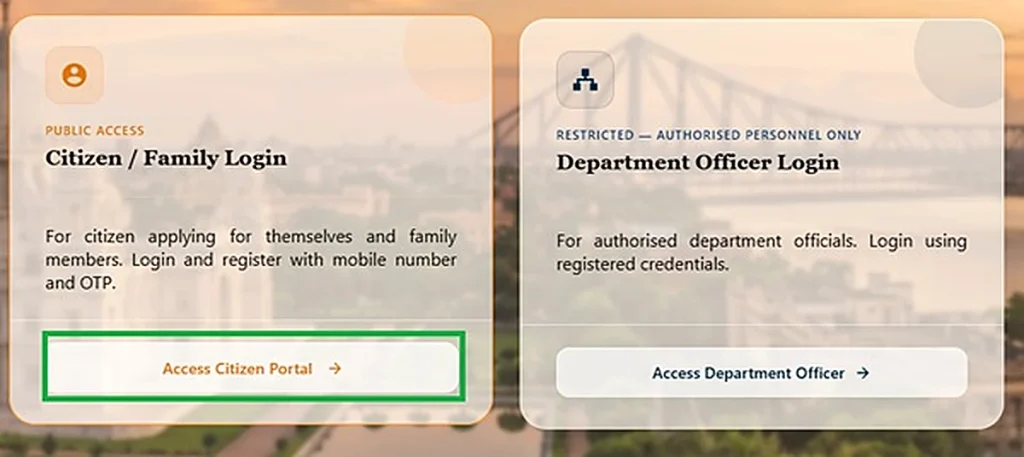
Use the Citizen / Family Login when you want to view your Annapurna application record or use the Claim & Objection facility.
Start by opening the official West Bengal Social Registry portal. Follow these steps:
Open the official website.
Enter socialregistry.wb.gov.in in your browser’s address bar. Check the website address before entering your mobile number or OTP.
Choose Citizen / Family Login.
Select the citizen or family option rather than Department Officer Login.
Select your district.
Choose the district connected to your application.
Enter your registered mobile number.
Use the same mobile number that you provided when submitting your application or family information.
Request and enter the OTP.
Ask the portal to send the verification code. Enter the OTP when it arrives. Portal guides describe it as a 6-digit OTP.
Open your family record.
After successful verification, the portal opens your application or family record. Read the application status shown on the record.
Keep these points in mind before trying again:
- Use the original mobile number. A different number will not open the family record connected to your application.
- There is no public name search. The portal does not offer public name-search or Aadhaar-search facilities. Only the registered family can access its record.
- Check the official portal again if a facility is missing. Portal facilities can pause between application windows. If you cannot find an option, check again later instead of trusting an unofficial website or agent.
You do not need to use the Department Officer Login to check your own application. That option serves government officers only.
What You See After Login
After a successful login, the portal opens your application record and the family details collected during the Family Level Data Collection. You can review the information in your record and view the status of your application.
You can check the current status label attached to your application. Reported labels on this route include:
| Status label | What it indicates |
|---|---|
| Submitted | The application has reached the submitted stage. |
| Under Process | The application remains in the processing stage. |
| Enquiry Processed | The enquiry process has been marked as processed. |
| Enquiry Reverted | The enquiry has a reverted status. |
| For Further Verification | The application requires further verification. |
| Accepted / Approved | The application has received an acceptance or approval status. |
| Bank Validation Failure | The application record shows a bank validation failure. |
| Rejected | The application has received a rejection status. |
Remember that a status label tells you the stage of your application. It does not confirm that money has reached your bank account. If a label confuses you, the status meanings guide explains what each label means in plain language.
For actual payment confirmation, check your bank passbook, statement or bank SMS. Our Annapurna Bhandar payment status guide explains how to check whether the money reached your account.
Claim & Objection — Inside the Same Login
You do not need a separate public account to access the Social Registry’s Claim & Objection facility. The same Citizen / Family Login that opens your application record also carries this option.
The portal lists a facility called Claim by Applicant. Reports described this option as open from 20 August 2026. An applicant can use it to raise a claim about her own record.
The portal also lists another option called Objection Against Someone. The facility supports document uploads, allowing applicants to provide documents in support of a claim.
Consider using the facility when:
- Your family record contains incorrect information.
- Your application does not appear in the record.
- You believe the authority has made an incorrect decision about your application.
Check your application status before raising a claim. This helps you understand what the portal currently shows about your application. The Social Registry Claim & Objection guide explains the filing process and how to track a claim in more detail.
The Family Level Data Collection Connection
Every record on the Social Registry starts with a Family Level Data Collection form. You can submit it at a BDO, SDO, or KMC Ward office, or online through the portal itself.
The form collects information about the household and its members. Its fields cover:
- EPIC details and Aadhaar numbers.
- Contact mobile number.
- Ration-card information.
- House, land and vehicle details.
- Annual family income.
- Religion and health insurance.
- Tax details and education.
- Disability information.
- Other DBT benefits.
- CAA/SIR 2026 details, where applicable.
This information helps the Social Registry maintain family-level records for social welfare schemes.
Important: Ration-card information does not make a ration card mandatory for Annapurna. The form includes a ration-card field, but a ration card is neither a mandatory application document nor an eligibility condition. Annapurna’s mandatory documents are EPIC, Aadhaar and an active mobile number.
If you want to understand every field before submitting information, see the Family Level Data Collection form guide.
Applicants looking for beneficiary information should also understand how to check official records. Our beneficiary list guide explains how to check beneficiary lists through official sources. This independent website does not publish anyone’s personal information.
Login Problems — What to Check
A login problem does not always mean that your application has disappeared. Check the issue carefully before visiting an office or asking anyone for help.
OTP Not Coming
First, check your mobile network. Wait for the message, then try requesting the OTP again once. Make sure you enter the number associated with your application. If the problem continues, follow the Annapurna OTP not coming guide.
Wrong Mobile Number
The Family Login works with the mobile number given in your application. Entering a different number will not open your record. If you have lost that number or changed it, contact your BDO or SDO office to follow the correction process. Do not pay any person or agent who promises to fix your login for money.
Record Opens but No Status Shows
Sometimes the office may not have uploaded your enquiry information yet. The portal facility may also be paused during an application window. Do not assume that a missing status automatically means rejection. Check the portal again and read our Annapurna status not showing guide for further help.
Login Option Missing Today
The portal has temporarily withdrawn modules before. The Citizen Login was paused at least once around August 2026. New applications also close between application windows, while status and claim facilities mostly remain available. Avoid unofficial links that promise access to a hidden login page.
Social Registry or Social Security — Which One Do You Need?
Both portals relate to Annapurna Yojana, but they serve different purposes. Choose the one that matches your need.
| Need | Portal |
|---|---|
| Full application record, family details, Claim & Objection | Social Registry — log in with district, mobile number and OTP. |
| Quick public status view without login | Social Security portal — Track Applicant Status. |
| Understand both portals side by side | Read the Annapurna Bhandar portal comparison guide. |
If you have not checked your application status yet, start with the Annapurna status-check guide.
The Social Registry is useful when you need your detailed family record or want to submit a claim. The Social Security portal is useful when you want a quick status view without using an OTP login.
Stay Safe on This Portal
Always type socialregistry.wb.gov.in directly into your browser. Check the address before entering your mobile number or other information.
Some websites use names that look similar to official government portals. Bengal Police ran an awareness campaign against mirror sites that collect bank and mobile details.
Fake Annapurna application links also circulated before the official portal became active. On 25 May 2026, The Telegraph reported that a minister warned people not to trust these links.
Follow these safety rules:
- Use the official Social Registry address for Family Login.
- Do not trust application links received through WhatsApp, SMS or Facebook.
- Do not share your OTP or Aadhaar OTP with another person.
- Never share your bank credentials.
- Do not install unofficial Annapurna status-check applications that ask for OTPs or bank details.
- Report cyber fraud by calling 1930.
No official mobile app for Annapurna appears in the available official sources. You should use the government portal itself for login, status checks, or claim facilities.
Remember, this independent website cannot access your government record. Never send your login details or OTP to any person claiming to help you.
বাংলায় সংক্ষেপে
Social Registry (socialregistry.wb.gov.in) হল পশ্চিমবঙ্গের Finance Department-এর একটি সরকারি পোর্টাল। এখানে district, আবেদনে দেওয়া mobile number এবং OTP দিয়ে login করলে নিজের আবেদনের status ও family record দেখা যায়।
এই পোর্টালে login ছাড়া status search করার সুবিধা নেই। একই Family Login থেকে Claim & Objection জমা দেওয়া যায় এবং প্রয়োজনীয় document upload করা যায়।
Department Officer Login শুধুমাত্র সরকারি কর্মীদের জন্য। সাধারণ আবেদনকারীদের Citizen / Family Login ব্যবহার করতে হবে।
OTP না এলে বা নিজের record খুলতে সমস্যা হলে BDO / SDO অফিসে যোগাযোগ করুন। নিজের OTP বা Aadhaar OTP কারও সঙ্গে share করবেন না।
Conclusion
The Social Registry is the detailed record portal for Annapurna applicants. Use the Citizen / Family Login to open your application record, review your family details, and use the Claim & Objection facility when something looks incorrect.
Remember that an application status does not prove payment. Your bank passbook, bank statement or bank SMS proves whether money reached your account. Use the official portal for your record and the Social Security portal’s tracker for a quick view.
Disclaimer: This website is an independent information guide and is not a government website. It has no affiliation with the Government of West Bengal. The site cannot log you in, check your application status, or change your record. The site does not collect your mobile number, OTP, or other personal details. Use the official government portals for these actions.
FAQs
What is social registry wb gov in?
Social Registry WB Gov In is the West Bengal Social Registry portal at socialregistry.wb.gov.in. It is the Family Level Data Collection Portal, which the Finance Department owns, and NIC designed. It holds family-level data for social welfare schemes, including applications for Annapurna Yojana.
How do I log in to the Social Registry portal?
Open socialregistry.wb.gov.in and choose Citizen / Family Login. Select your district, enter the mobile number registered with your application, and enter the OTP. Your application and family record will open after verification.
Can I check my Annapurna status on the Social Registry without logging in?
No. The Social Registry does not provide a public status search without login. You must use your district, the mobile number registered with your application, and the OTP to access your record.
Which mobile number works for the Family Login?
Use the mobile number you provided when submitting your application or family information. A different number will not open your record. Contact your BDO or SDO office if you have lost that number or changed it.
What is the Department Officer Login — can I use it?
Department Officer Login is for government officers and office staff carrying out official work. Applicants cannot use it. Use the Citizen / Family Login to view your own application record.
What can I do inside the Social Registry after login?
You can view your application status and family record. You can also access the Claim & Objection facility to raise a claim about your record, object to information related to someone else, and upload documents.
How do I file a Claim or Objection on the Social Registry?
Log in through Citizen / Family Login and use the Claim & Objection facility. The portal provides Claim by Applicant, open from 20 August 2026, and Objection Against Someone. Use it when your record, application, or decision appears incorrect.
The OTP is not coming. What should I do?
Check your mobile network, wait for the message and request the OTP again once. Make sure you use your registered mobile number. If the problem persists, contact your BDO or SDO office or use the detailed OTP guidance.
Is the Social Registry the same as the Social Security portal?
No. The Social Registry provides family records and Claim & Objection after login. The Social Security portal provides a public Track Applicant Status view without login.
Does the Social Registry show my payment history?
The Social Registry does not provide a dedicated online facility for Annapurna payment history, instalment details, or DBT credit status. Check your Aadhaar-linked bank passbook, statement or SMS to confirm whether money reached your account.
Portal details last checked: 10 November 2026.