The only citizen annapurna bhandar portal login is the Citizen / Family Login on the West Bengal Social Registry portal. You need your district, the mobile number you gave in your application, and the OTP that the portal sends to that number.
The other login buttons on the two official portals belong to government office staff, not citizens. This guide explains which login to choose, how to open your Family Login, and how to fix common problems such as a wrong number, a missing OTP, or a login option that has disappeared.
Quick Answer
Citizens must log in through socialregistry.wb.gov.in using Citizen / Family Login. Select your district, enter the mobile number from your application, and enter the 6-digit OTP sent by the portal.
The Login button on socialsecurity.wb.gov.in is for government office users only. Citizens should choose Track Applicant Status on that portal instead. They do not need to log in to use the public tracker.
Three Doors — Only One Is Yours
The two Annapurna-related portals show different login options. Do not assume that every button marked Login belongs to citizens.
Use this table to identify the correct option before entering your details.
| Door | Where | Who it is for | What it opens |
|---|---|---|---|
| Citizen / Family Login | socialregistry.wb.gov.in | Citizens — this is YOUR login | Your family record, application status, Claim & Objection, and document upload |
| Department Officer Login | socialregistry.wb.gov.in | Government department staff only | Staff work screens |
| Login button | socialsecurity.wb.gov.in/Office/login | Office users only (the button says so) | Office work screens — citizens use the public Track Applicant Status on the same page instead |
If a page asks for a staff username and password, you are at the wrong door. Go back and choose the citizen option.
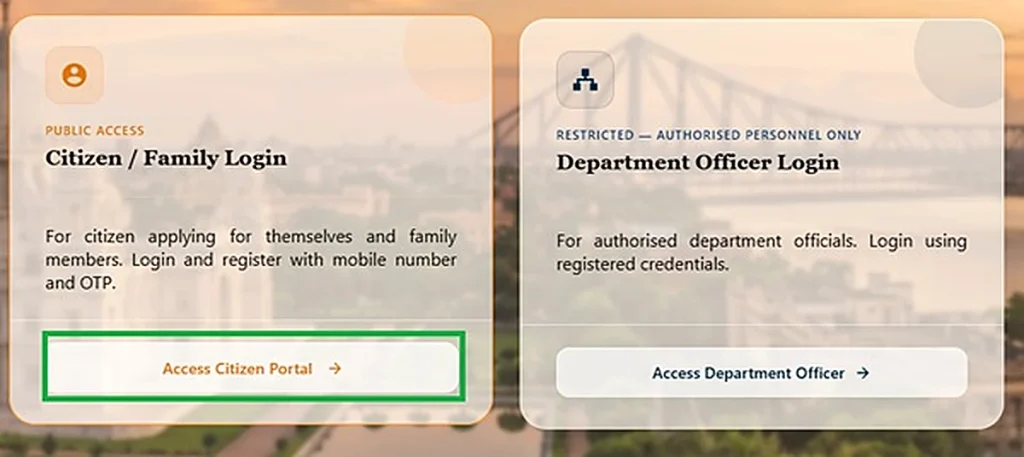
Family Login — Step by Step
Open the official portal first — start your login at socialregistry.wb.gov.in.
- Open the official portal: Visit socialregistry.wb.gov.in.
- Choose Citizen / Family Login: Select Citizen / Family Login on the portal.
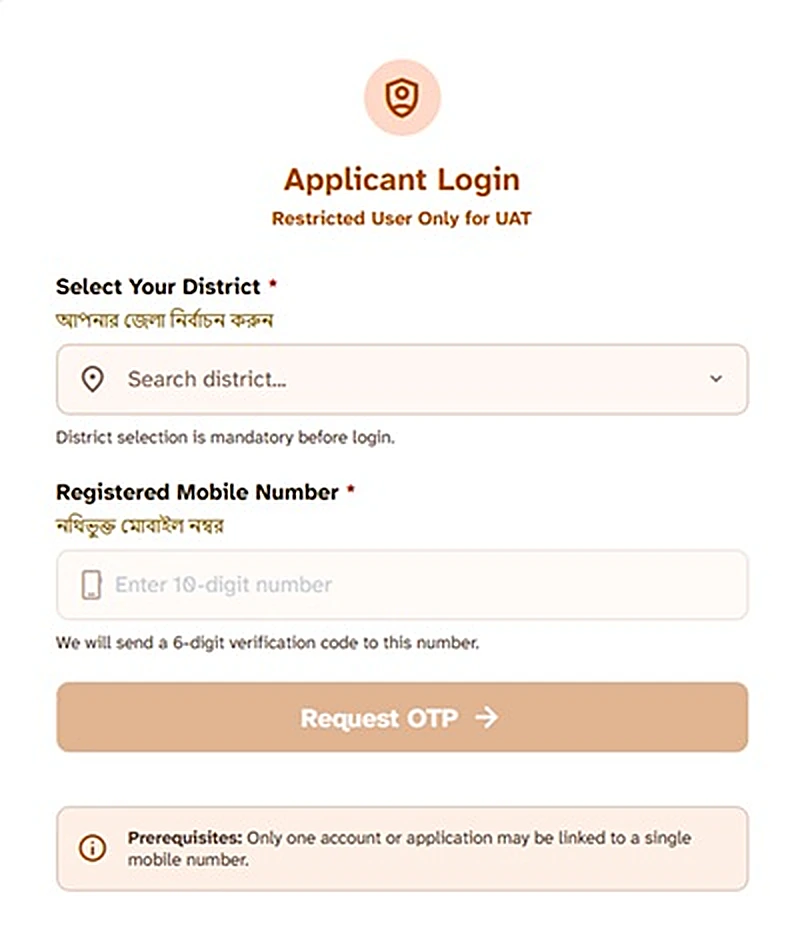
- Select your district: Choose your district from the list.
- Enter your registered mobile number: Type the mobile number you gave in your application or Family Level Data Collection form.
- Enter the OTP: Enter the 6-digit OTP that the portal sends to that number.
- Open your record: Your application status appears after login. The same login also gives you Claim & Objection and document upload.
For more about the portal itself, its family records, and its other facilities, see our complete Social Registry guide.
Keep your registered mobile number active. The login cannot work without the OTP that goes to that number.
No Login Needed — The Public Tracker
You do not need a login to check your application stage quickly. Open the Social Security portal’s public page at socialsecurity.wb.gov.in/Office/login and choose Track Applicant Status.
Track Applicant Status asks for no login and no OTP. A guide that inspected the live page reports that it asks for your registered mobile number.
Use the tracker for a quick stage check. Use Family Login for your full record, claims, and uploads.
You can read the tracker steps in our complete guide to Track Applicant Status.
Login Not Working? Run These Fixes
You picked the office door
The Social Security Login button and the Department Officer Login reject citizens by design. They need staff credentials, so return to the citizen route above.
Wrong district or wrong number
The login matches your district and the exact registered number. A different district or a newer number finds no record, so check both details carefully before you try again.
If your registered number has changed or you want help with the number-based check, read our guide to checking the status with a phone number.
OTP does not arrive
OTP trouble can come from a weak signal, a wrong number, or heavy load on the portal. Check these points first before you assume that your record is missing.
Our OTP fixes guide explains the other causes and the steps in detail.
Never pay anyone who offers to “arrange” your OTP. No person can arrange a portal OTP for you.
The login option itself is missing
Portal modules have been withdrawn temporarily before, and the citizen login was paused around August 2026. Facilities return, so the missing option does not mean that the scheme has ended.
Check the same official page again later. Do not switch to a look-alike site in the meantime.
Login Safety — Non-Negotiable Rules
- Your OTP is yours alone. Portal staff, bank staff, and this website never ask for it. Share it with no one.
- Type portal addresses yourself. Mirror sites collect mobile and bank details, and Bengal Police ran an awareness campaign against them. Report cyber fraud on 1930.
- No official app exists in any official source. A login inside an “Annapurna app” is a fake login.
বাংলায় সংক্ষেপে
নাগরিকদের একমাত্র login হলো socialregistry.wb.gov.in-এ Citizen / Family Login। এর জন্য district, registered mobile number আর OTP দরকার।
socialsecurity.wb.gov.in-এর Login button শুধু office user-দের জন্য। নাগরিকরা সেখানে login ছাড়াই Track Applicant Status ব্যবহার করেন।
ভুল নম্বর বা ভুল district দিলে record খুলবে না।
OTP কাউকে বলবেন না। Portal-এর address নিজে type করুন।
Login option মাঝে মাঝে সাময়িকভাবে বন্ধ থাকে। পরে আবার একই official page-এ চেষ্টা করুন।
Conclusion
Use only one citizen door: the Citizen / Family Login on the Social Registry portal. Use the public tracker on the Social Security portal when you need only a quick stage check. Ignore the two staff doors.
Most login failures come from the wrong door or the wrong number. Check the door first, then check your district and registered number.
Disclaimer: This website is an independent information guide. It is not a government website, and it has no affiliation with the Government of West Bengal. We never ask you to log in here or share an OTP. Log in only on the official portal.
FAQs
Where do citizens log in for Annapurna Bhandar?
Citizens log in only on the Social Registry portal at socialregistry.wb.gov.in. Choose Citizen / Family Login, select your district, and enter your registered mobile number and OTP.
What do I need for the Family Login?
You need your district, the registered mobile number from your application, and the OTP sent to that number. Keep that number active so you can receive the OTP.
The portal asks for a username and password. What should I do?
Leave that page because it is the office login. Go back to the Social Registry portal and choose Citizen / Family Login, which uses your district, registered mobile number, and OTP.
Can I log in with my Aadhaar number?
No. The Family Login uses your district, registered mobile number, and OTP. It does not use Aadhaar as a login detail.
My login worked before but the option is gone now. Why?
Portal modules have been withdrawn temporarily before, and the citizen login was paused around August 2026. Facilities return, so check the same official page again later.
Is the Social Security portal login for citizens?
No. The Login button on socialsecurity.wb.gov.in is for office users only. Citizens use Track Applicant Status on the same public page instead, with no login.
Someone asked for my OTP to log in for me. Is that safe?
No. Never share your OTP with anyone, even if the person offers to log in for you. Portal staff, bank staff, and this website never ask for it.
Portal details last checked: 10 November 2026.