The family level data collection form is the main application route for families entering West Bengal’s Annapurna Yojana system. You can fill it at a BDO, SDO or KMC Ward office, or online through the Social Registry portal. The information you provide creates your family’s official record.
This guide explains every field the form collects, what you should prepare before filling it, and how to avoid mistakes that can cause problems with your application, bank validation or future status checks. It also explains why the ration-card question does not mean you must have a ration card to qualify.
Quick Answer
The Family Level Data Collection form collects your family’s EPIC details, Aadhaar numbers, contact number, ration-card information, house, land and vehicle details, annual family income, religion, health insurance, tax details, education, CAA/SIR 2026 information (if applicable), other DBT benefits and disability information.
Fill it at a BDO, SDO or KMC Ward office, or online through the Social Registry portal. Only three documents are mandatory: EPIC, Aadhaar and an active mobile number.
Where You Meet This Form
West Bengal provides two official routes to complete the Family Level Data Collection form.
- Offline: Visit the appropriate BDO office in rural areas, SDO office in urban areas or KMC Ward office in the Kolkata/KMC area.
- Online: Visit the West Bengal Social Registry portal and use the available citizen facility.
Both routes collect family information for the West Bengal Social Registry. The portal operates as a beneficiary database initiative for social welfare schemes across different state departments. The Finance Department owns its process and content, while NIC designed the portal.
What happens after you fill the form?
Your submitted information becomes your family’s Social Registry record. This record matters beyond the initial application because the Citizen / Family Login opens the same family information for status checks, claims, objections and document uploads.
You can learn how the family record, login and other portal facilities work in our complete Social Registry guide.
Remember that the government opens new applications in specific windows. You cannot assume that the application facility will remain available throughout the year.
During the scheme’s launch, Jan Kalyan Shivir camps ran from 15–17 June 2026. These camps formed part of the initial rollout.
Important: The Family Level Data Collection form is an application route, not a guarantee of approval. Authorised officials enquire into applications before the government sanctions eligible beneficiaries.
Every Field the Form Asks
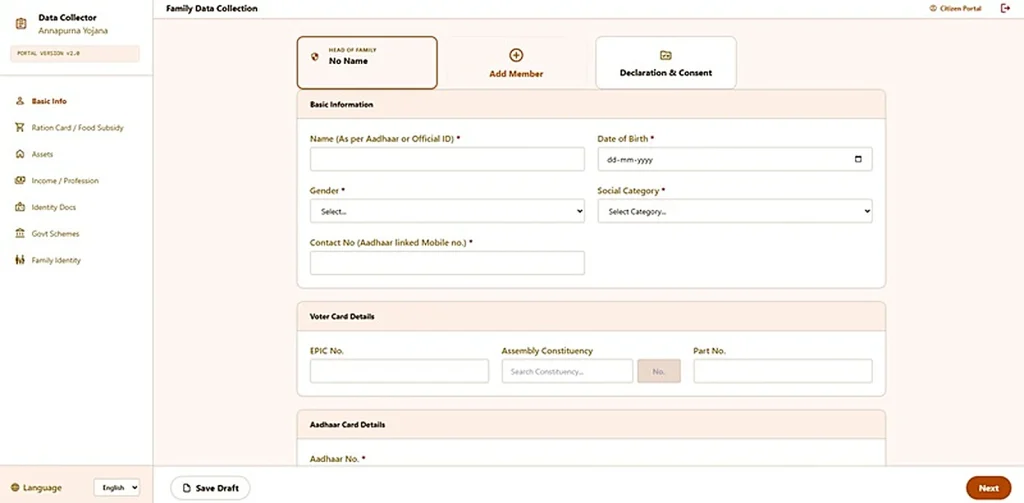
The official form collects information about your identity, household, income, property and other circumstances.
Use the following table to prepare the information before you start. It groups the official field list by subject so you can understand what each part covers.
| Group | Fields the form collects |
|---|---|
| Identity | EPIC details; Aadhaar numbers |
| Contact | Contact (mobile) number |
| Household basics | Ration-card information; religion; education |
| Assets & income | House / land / vehicle details; annual family income |
| Money & cover | Health insurance; tax details; other DBT benefits you receive |
| Special cases | CAA / SIR 2026 (if applicable); disability information |
Prepare these details before you start. The form rewards a prepared applicant and punishes guesswork because incorrect entries can create record problems later.
Identity: EPIC and Aadhaar
The form collects your EPIC details and Aadhaar numbers. EPIC refers to your voter identity card.
Prepare these identity details before filling the form. Check the names carefully and use the same spelling that appears on your documents.
Your identity information matters because the scheme sends the monthly benefit through Direct Benefit Transfer (DBT) to the Aadhaar-linked bank account in your own name.
Contact: Mobile number
The form asks for your contact mobile number. This number becomes important when you use the Social Registry’s Family Login and check your application status.
Choose a number that you can keep active. Avoid using someone else’s phone simply because you do not have your own phone nearby.
Household basics: Ration card, religion and education
The form collects ration-card information, religion and education details.
These questions help build your family’s Social Registry record. Do not confuse a request for information with a separate eligibility condition.
In particular, the ration-card field does not mean the government requires a specific ration-card category for Annapurna Yojana.
Assets and income: House, land, vehicle and annual income
The form asks about your family’s house, land and vehicle details. It also collects annual family income.
Prepare accurate information about your household before answering these questions. Do not guess values or hide details because you think a particular answer will improve your chances.
The official scheme criteria do not publish a general monthly family income ceiling of ₹10,000. Do not treat that figure, which appears on some blogs, as an official eligibility rule.
Money and cover: Insurance, tax and DBT benefits
The form collects information about health insurance, tax details and other DBT benefits your family receives.
Answer these questions honestly. The government uses the information during the application enquiry and eligibility process.
Do not assume that receiving another DBT benefit automatically makes you ineligible. Follow the official criteria rather than claims circulating online.
Special cases: CAA, SIR and disability
The form also asks about CAA / SIR 2026, where applicable, and disability information.
Provide the relevant information accurately. If a question does not apply to your family, do not invent an answer.
These details help the government understand your family’s circumstances during the application process.
The Ration-Card Question — Read This Carefully
This is one of the most confusing parts of the Family Level Data Collection form.
The form asks for ration-card information, but a ration card is not a mandatory document or an eligibility condition for Annapurna Yojana.
These are two different things:
A form field collects information about your family.
An eligibility condition determines whether you qualify for the scheme.
The government includes ration-card information in the family data collection process. However, the official mandatory document list contains only three items:
EPIC (voter card).
Aadhaar.
An active mobile number.
The official documents do not require applicants to hold a particular ration-card category.
Some websites claim that applicants must have an AAY, PHH, SPHH or RKSY ration card. Do not treat these claims as government rules. No official document in the scheme’s notification or SOP establishes such a requirement.
What should you enter if your family has no ration card?
Answer the ration-card question honestly with the information that applies to your household.
Do not borrow, buy or arrange a ration card just to complete this form. Never provide false document information to make your application appear stronger.
Also remember that Annapurna Yojana and Khadya Sathi are separate schemes. Khadya Sathi provides subsidised foodgrains through digital ration cards. Annapurna Yojana provides a monthly cash benefit. It does not provide additional foodgrains.
Do not confuse Annapurna Yojana with the separate central Annapurna Scheme either. That older central scheme provides foodgrains to a different group of destitute senior citizens. It is not the West Bengal women’s cash-benefit scheme.
How to Fill It Without Creating Future Problems
A small mistake in your family information can create difficulties later. Follow these four checks before submitting your details.
Match names exactly
Write names as they appear on your EPIC and Aadhaar documents. Check spelling carefully instead of using a nickname, shortened name or a different spelling that you commonly use.
For example, if your name appears differently on your voter card and Aadhaar, do not randomly choose another spelling while filling the form.
Name mismatches can create problems during bank validation and status checks. If you encounter a bank validation failure later, our bank validation and Aadhaar seeding guide explains the issue and the checks you should make.
Also check your Aadhaar details before relying on them for the DBT process.
Give the mobile number you will keep
Use the mobile number you expect to keep active for years. Avoid entering a borrowed number just to complete the form quickly.
The registered number becomes important for OTP-based Family Login and application status checks. If you later change or lose access to that number, accessing your family record may become difficult.
Keep the number available whenever you need to use the Social Registry.
If your registered number causes problems during a status check, see our Annapurna Bhandar status check by phone number guide.
Answer income and assets honestly
Report your annual family income and household assets truthfully.
The form asks about your house, land and vehicle details. It also asks about tax information and other DBT benefits.
Do not hide property, change income figures or provide information that does not match your actual circumstances. An incorrect answer can create a problem when officials examine your application.
The official eligibility rules determine who qualifies. A statement such as “poorest of the poor are the first priority” describes the government’s priority, not a fixed income ceiling.
If you are unsure how a particular detail applies to your family, provide accurate information and let the official enquiry process assess your application.
Keep a copy of what you submitted
After completing the form, keep your own note of:
The date you submitted the information.
The office where you completed the form, if you used the offline route.
The details you entered in the form.
This simple record can help you remember what information you provided if you notice a mistake later.
Do not assume that an incorrect entry will correct itself. If your family record contains wrong information, use the available correction process. Our Social Registry Claim and Objection guide explains the claim and objection facilities.
বাংলায় সংক্ষেপে
Family Level Data Collection form BDO / SDO / KMC Ward office-এ অথবা socialregistry.wb.gov.in-এ online পূরণ করা যায়।
এই form-এ EPIC, Aadhaar, mobile number, ration-card তথ্য, বাড়ি, জমি, গাড়ি, বার্ষিক আয়, ধর্ম, health insurance, tax, education, CAA/SIR (প্রযোজ্য হলে), অন্য DBT এবং disability তথ্য চাওয়া হয়।
Ration card বাধ্যতামূলক document নয়। বাধ্যতামূলক document শুধু EPIC, Aadhaar এবং একটি active mobile number।
Form পূরণের সময় EPIC ও Aadhaar অনুযায়ী নামের বানান মিলিয়ে লিখুন। যে mobile number দীর্ঘদিন ব্যবহার করবেন, সেটিই দিন।
Form জমা দেওয়ার তারিখ, office এবং নিজের দেওয়া তথ্যের একটি note নিজের কাছে রাখুন।
Conclusion
The Family Level Data Collection form is the front door of the Annapurna Yojana system. Its fields become your family’s Social Registry record, so prepare your identity, contact, household, income and other details before filling it. Use your actual information, match names with EPIC and Aadhaar, and provide a mobile number you can keep active.
Remember that the form asks for ration-card information, but a ration card is neither a mandatory document nor an eligibility condition. The three mandatory documents are EPIC, Aadhaar and an active mobile number. A careful application can prevent avoidable record problems, but the government must still examine and sanction your application.
Disclaimer: This website is an independent information guide. It is not a government website and has no affiliation with the Government of West Bengal. We do not provide or collect this form. Fill it only at official offices or on the official portal. We collect no personal details.
FAQs
What is the Family Level Data Collection form?
It is the official form that collects family information for the West Bengal Social Registry. You use it to enter the Annapurna Yojana application process through an authorised office or the online portal.
Where can I fill the Family Level Data Collection form?
You can fill it at a BDO office in rural areas, an SDO office in urban areas or a KMC Ward office. You can also use the online Social Registry portal at socialregistry.wb.gov.in when the application facility is available.
What information does the form ask for?
It asks for identity, contact, household, asset, income, insurance, tax, education, DBT and special-case information. It also collects ration-card details and CAA/SIR 2026 information where applicable.
Is a ration card compulsory for this form?
No. The form asks for ration-card information, but a ration card is neither a mandatory document nor an eligibility condition. Do not arrange or borrow a ration card just to complete the form.
Which documents are actually mandatory for Annapurna Yojana?
The official mandatory list contains three items: EPIC (voter card), Aadhaar and an active mobile number. The official list does not make a ration card compulsory.
I made a mistake on the form. How do I fix it?
Check your family record and use the available Claim & Objection facility to raise an issue. Keep a note of the information you originally entered so you can explain the correction clearly.
Does filling this form guarantee I will get ₹3,000?
No. Filling the form starts the application process but does not guarantee approval. Authorised officials examine applications, and the relevant authority must sanction eligible beneficiaries before the government provides the monthly benefit.
Portal details last checked: 10 November 2026.